
- zentroStack Web Chat
AI Chatbot for Website Visitors That Answers and Captures Leads
zentroStack Web Chat is an AI chatbot for website owners who can’t sit at a live chat all day. It answers visitors 24/7 from what you teach it, saves their name, email and phone as a lead, and lets you take over any chat yourself.
- One zentroStack login. Works on any website, including WordPress.

- Answers from your knowledge
- Leads saved from every chat
- Human takeover in one click
Visitors Leave When Nobody Answers
Most visitors arrive with one question: do you do this, how much is it, are you open on Saturday. If the answer is not on the page in front of them, a contact form asks them to wait, and many go back to the search results instead. A live chat box only helps while someone is sitting at it.
An AI chatbot for website visitors answers that question straight away, at 2pm or 2am, and keeps the conversation going until you can step in.
What the AI Chat Widget for Website Owners Does
Answers from your knowledge
Your Q&A, FAQs, web pages and PDFs. It is told never to invent prices, promises or policies.
Captures every lead
It answers first, then asks for a name and email, and saves name, email and phone with the full chat.
Human takeover
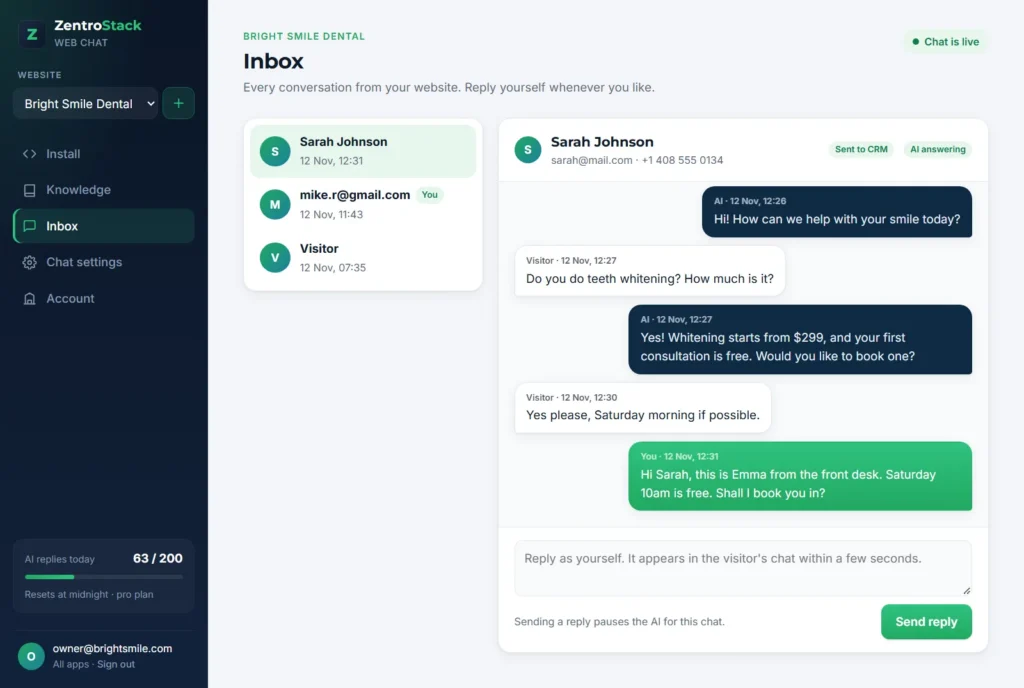
Reply from the Inbox and the AI pauses for that chat. Hand it back with one click.
Your choice of AI
OpenAI, Claude, Gemini, Groq, Mistral, DeepSeek, Grok, OpenRouter, Together AI or any OpenAI-compatible API.
Your brand, your rules
Pick the colour, corner, greeting and tone, and choose which websites may show the chat.
Leads into zentroCRM
Chats with an email or phone number go straight into your zentroCRM pipeline when you use both.
What Is an AI Chatbot for Website Visitors?
An AI chatbot for website visitors is a small chat window on your site that answers questions in plain language, using a language model and the information you give it. Unlike a scripted chatbot with buttons, it understands the question as the visitor typed it. A good one also knows when to stop: it collects contact details and passes the conversation to a person.
How does the AI chatbot for website customer service work in zentroStack?
You add your knowledge, connect an AI key and paste one line of code. When a visitor writes, Web Chat picks the most relevant answers from your knowledge, asks your chosen AI to reply in two or three short sentences, and saves the conversation in your Inbox. If the answer is not in your knowledge, it says it will find out and asks for an email so you can follow up. Your reply from the Inbox appears in the visitor’s chat within seconds.
Set Up Your AI Chatbot for Website in 3 Steps
Teach it
Import your website, upload PDFs, paste your FAQs or write answers by hand.
Connect AI
Choose your AI provider, paste your API key and press Test connection.
Paste the code
Add one line before the closing body tag, or install the WordPress plugin. The chat is live.
A Small Business Chatbot for Sites Visitors Ask First
A small business chatbot fits any business where people ask before they buy or book: clinics, salons, trades, cleaning companies, consultants, agencies, tutors and online shops with a short list of common questions.
If you answer the same ten questions every week, Web Chat answers them for you, and you keep the conversations that need a person. You can run it on several websites from one account, each with its own knowledge, colour and greeting.
Four Ways to Teach Your Website Chat
The AI chat widget for website visitors answers only from what you add in Knowledge, so you decide what it says:
- Q&A: write a question and its answer by hand.
- FAQs: paste a whole list. Each question on its own line becomes one entry.
- Website: enter your address. Web Chat reads that page and up to 20 pages it links to, split by heading.
- PDF: upload menus, price lists or brochures, up to 10 MB each.
Every entry stays editable, and a whole page or PDF can be removed in one click. Import again any time to refresh it.
Works With OpenAI, Claude, Gemini and More
Your AI chatbot for website visitors is not tied to one AI company. In Account you pick a provider, paste your API key and choose a model: OpenAI (ChatGPT), Anthropic (Claude), Google (Gemini), Groq, Mistral, DeepSeek, xAI (Grok), OpenRouter, Together AI, or any OpenAI-compatible address.
Replies are billed by that provider on your own account, so you see exactly what the AI costs. The Test connection button makes one small real call, so a wrong key or model name shows up before a visitor sees it. Your key stays on the server and is never shown back in the dashboard.
AI Chatbot for Website Builders and WordPress
On WordPress, download the zentroStack Web Chat plugin from the Install tab, upload it in Plugins, Add New, then paste your chat code in Settings. That makes an AI chatbot for website WordPress setup a two-minute job, with no theme files to edit. WordPress explains how to install a plugin if you have not done it before.
To run the AI chatbot for website pages on any other site that lets you add custom code, paste the same single line before the closing body tag. In Chat settings, a live preview shows the chat on a sample page while you change the colour, name, greeting and corner.
AI Chatbot for Website vs a Contact Form
What happens
Contact form
zentroStack Web Chat
Question at 11pm
Visitor waits for an email reply
Answered in seconds
Same question every day
You type the answer each time
Answered from your knowledge
Visitor details
Only if they fill in the form
Name, email and phone saved from the chat
You want to talk yourself
Email back and forth
Take over the chat from the Inbox
More than one website
One form per site
Several websites in one account
When Web Chat Is Not Enough
An AI chatbot for website visitors is only as good as its knowledge: thin knowledge means thin answers. Web Chat does not take payments, book appointments by itself or answer phone calls, and it cannot read scanned PDFs or websites that load all their text with JavaScript.
Complaints and sensitive health, legal or money matters need a person. The AI takes the first message and the contact details, and you take over. zentroStack is not HIPAA compliant, so do not use the chat to collect medical records. Today you connect your own AI key, so you need an account with one of the supported providers.
Better With the Rest of zentroStack
Web Chat uses the same zentroStack login as every other app. Add the CRM to keep every chat lead in one pipeline, the WhatsApp chatbot for messages and the AI answering service for calls.
AI Chatbot for Website: Questions and Answers
What is an AI chatbot for website owners?
It is a chat window on your site that answers visitors’ questions in plain language from information you provide, and passes the conversation to you when a person is needed. zentroStack Web Chat also saves each visitor who shares details as a lead.
How do I add an AI chatbot to my website?
To add an AI chatbot for website visitors, sign in at chat.zentrostack.com with your zentroStack login, add your knowledge, connect an AI key, then paste one line of code before the closing body tag. On WordPress you can install the plugin instead.
Is there an AI chatbot for website WordPress plugin?
Yes. Download the zentroStack Web Chat plugin from the Install tab, upload it in Plugins, Add New, and paste your chat code in Settings. It also works on any other website that lets you add custom code.
Which AI models can I use?
OpenAI, Anthropic Claude, Google Gemini, Groq, Mistral, DeepSeek, xAI Grok, OpenRouter, Together AI or any OpenAI-compatible API. You choose the model, and the Test connection button checks your key before visitors see a reply.
Will the chatbot make up answers?
It is instructed to answer only from your knowledge and never to invent prices, delivery times or policies. When it does not know, it says it will find out and asks for an email. As with any AI, check its replies in the Inbox.
Can I reply to visitors myself?
Yes. Open the chat in the Inbox and reply. The AI pauses for that conversation and your reply appears in the visitor’s chat within seconds. Click “Let the AI answer again” to hand it back.
How much does Web Chat cost?
Web Chat prices are not published yet. The AI replies are billed by your own AI provider at its own rates. Talk to us for current Web Chat pricing.
Which is the best AI chatbot for a small business website?
The best AI chatbot for website visitors answers only from your own information, hands over to a person and saves leads where you work. Web Chat does those three and lets you pick the AI provider, so test it on your own site with real visitor questions.
Answer Every Website Visitor, Even After Hours
Set up your AI chatbot for website visitors with your zentroStack login. It takes a few minutes.